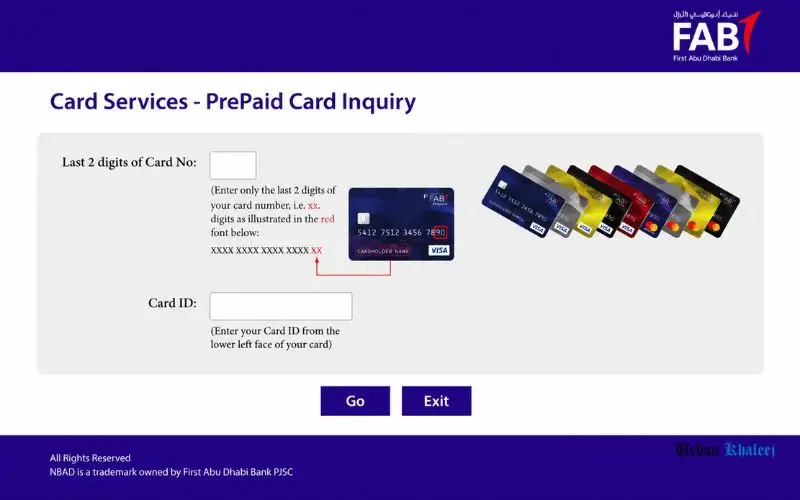
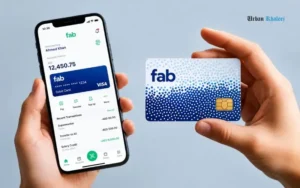
If you are paid with a prepaid payroll card or card payment from First Abu Dhabi Bank (FAB), then it is crucial to know how to do a FAB prepaid card inquiry. It lets you view your available balance, check if your salary is credited, see your recent transactions, and also check if your card is active—without even going to the bank branch.
Online prepaid card services are available around the clock, and FAB offers a secure online inquiry portal, which runs on its platform, Magnati. Inquiries can be made in a matter of minutes with just a few simple steps and require the card number for the Ratibi salary card, Payment Prepaid Card, or any other type of FAB prepaid card.
What Is a FAB Prepaid Card Inquiry?
A FAB prepaid card inquiry is an online service where eligible prepaid cardholders can view key information about their prepaid cards without an online banking login.
This service is geared toward prepaid cards that are controlled via the Magnati prepaid platform.
Through the inquiry portal, users can normally:
- See if there is any credit available on the card
- View recent transactions
- Verify salary credit
- Confirm card status
- Keep a check on the usage of prepaid cards.
It is offered online all day and doesn’t require a conventional bank account for approved prepaid cards.
Which FAB Cards Support Online Inquiry?
Various FAB prepaid products offer online inquiry services.
Ratibi Salary Card
The Ratibi card has been crafted for employees who have a payroll income of up to AED 5,000. It allows them to pay salaries without having a traditional bank account.
Payment Prepaid Card
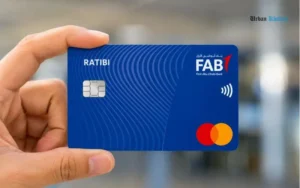
This card is used for business payments, managing petty cash, and recurring corporate expenses.
Balances can be accessed on the internet via the prepaid inquiry service.
Other Eligible Prepaid Cards
Some prepaid cards issued by a different organization on FAB’s prepaid platform may also provide online inquiry services. This is dependent on the card program.
Requirements Before You Start
Here are some things to have on hand before you log on to the inquiry site:
| Requirement | Purpose |
| Last four digits of your prepaid card | Card identification |
| Card ID | Verification |
| Internet connection | Access portal |
| CAPTCHA verification | Security validation |
The Card ID will appear on the prepaid card you receive.
How to Perform a FAB Prepaid Card Inquiry Online
Inquiry online typically takes just under a minute.
Open the Official Inquiry Portal
Go to the Magnati Prepaid Card Inquiry website.
The portal is the official service for prepaid cardholders of FAB.
Enter the Last Four Digits
Enter the last 4 digits on your prepaid card.
Double-check the numbers before going to the next step.
Enter Your Card ID
Find the Card ID that is printed on your prepaid card.
Write it down word for word.
Complete CAPTCHA
To determine if you are a legitimate user, you will be asked for a security code that is shown on the screen.
Submit the Request
The system will show you the information on your prepaid card within a few seconds if the information is correct.
What Information Can You See?
The inquiry portal might show.
- Available balance
- Recent card transactions
- Salary credit information
- Card status
- Card validity
- Transaction history
The specific information that is presented will vary depending on the type of prepaid card and the employer program.
Benefits of Using Online Inquiry
There are a few benefits to monitoring your prepaid card online.
Fast Access
You can view your balance in minutes, without having to visit the branch.
Available Anytime
The portal is accessible on the Internet around the clock.
Secure Verification
To secure account information, the portal asks for the card information and the CAPTCHA verification.
No Branch Visit
It can all be done on a computer, tablet, or smartphone.
Helpful for Salary Verification
Employees can easily check if their salary has been credited to their account on a monthly basis.
Can You Check Salary Through the Inquiry Portal?
If your employer issues your wages on a FAB prepaid payroll card, the inquiry portal can be used to verify whether wages have been credited.
Employees don’t need to wait for SMS alerts or go to an ATM to check on the available balance; they can check online.
This is especially helpful to those with the Ratibi salary card.
Read Also: Al Ansari Exchange ATM Card Balance Check
Common Reasons Why the Inquiry May Not Work
Occasionally, users may experience problems while checking their prepaid card.
Incorrect Card ID
The Card ID should be the same as the Card ID printed on the card.
Wrong Card Digits
If the card numbers are not entered correctly, they will not be verified.
Always be sure to check the last 4 digits before entering.
CAPTCHA Error
Security codes are short-lived.
If this is the case, refresh the page and input the new code.
Temporary System Maintenance
The portal will be down for maintenance some of the time.
It’s likely to be a problem if it lasts for a few minutes before you try again.
Card Expired
Cards that are expired cannot be used for online enquiries.
If your card has expired, please contact your employer or FAB support.
Security Tips When Using the Inquiry Portal
It’s crucial to safeguard your prepaid card data.
Do the following:
- Never give out your Card ID.
- Don’t use free WiFi connections.
- Access only the official prepaid inquiry portal.
- Never share card information by providing screenshots.
- If applicable, always log out after making your query.
- Don’t lose your physical card.
These practices help reduce the risk of unauthorized access.
Alternative Ways to Check Your FAB Prepaid Card
The online inquiry form is the fastest method, but for other prepaid card types and services offered under your employer’s payroll program, FAB offers alternative avenues for accessing your prepaid card information.
Check Your Balance at an ATM
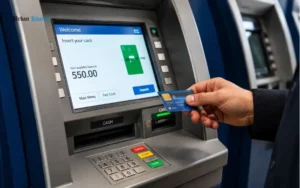
If your prepaid card has an ATM option, you can use an ATM to check how much money is available on your card.
To do this:
- Put your prepaid card in the ATM.
- Enter your PIN.
- Select Balance Inquiry.
- Check the screen or print a receipt, if available, for your available balance.
The fees charged by the ATM operators may vary depending on the ATM network. Check your company’s payroll system or FAB’s prepaid card rules and see if any fees apply.
Contact FAB Customer Support
If you are unable to access the online inquiry portal or notice unusual activity on your prepaid card, it is best to contact FAB Customer Support.
Customer support can help with:
- Card activation status
- Cards that are lost or stolen.
- Blocked cards
- Failed salary credits
- Transaction disputes
- PIN-related issues
- Card replacement requests
Before you speak to a customer service representative, check your ID.
Check Salary Notifications
A few employers who are involved in FAB payroll programs send out SMS alerts when payments are credited.
This service is employer-dependent, but it is another convenient way to verify salary payments without accessing the inquiry portal.
FAB Prepaid Card vs. Payroll Card: What’s the Difference?
It can be easy to mistake prepaid cards for payroll cards because they are sometimes used to pay salaries. They are similar but not the same.
| Feature | FAB Prepaid Card | FAB Payroll Card |
| Linked to a bank account | Usually No | Usually No |
| Salary payments | Supported in eligible programs | Yes |
| Reloadable | Depends on card type | Yes |
| Online inquiry | Yes, for eligible cards | Yes |
| ATM withdrawals | Available on supported cards | Yes |
| Purchases at merchants | Supported | Supported |
Payroll cards are typically issued by employers to pay employee wages as part of an approved payroll program, while prepaid cards can also be used for corporate payments, allowances, or other prepaid programs.
Common FAB Prepaid Card Inquiry Problems and Solutions
Once the cause is known, most inquiry issues can be easily resolved.
Invalid Card Information
If an error is shown when submitted on the portal:
- Repeat the last four digits of your card.
- Enter the Card ID word-for-word.
- Avoid extra spaces.
Card Not Recognized
Your card may not yet be activated.
Newly issued cards may need to be “activated” before inquiry services can be used.
If already activated, please call your employer or FAB support.
Read Also: Salik Balance Check
Salary Has Not Appeared
Here are a few possibilities:
- The employer has not paid wages.
- Processing of salary is still ongoing.
- Processing time is delayed at the bank.
- Payroll has been impacted by public holidays.
If everyone has been paid except you, then talk to your employer first.
Website Not Loading
The prepaid inquiry portal might be unavailable from time to time because of planned maintenance or a temporary technical problem.
Try:
- Refreshing the page.
- Deleting browser cookies.
- Using another browser.
- Repeat an attempt after a period of time.
Forgotten PIN
There is no need to enter an ATM PIN when using the online inquiry system.
If you are interested in accessing ATM services and have forgotten your PIN, please reach out to FAB Customer Support with your card program for PIN services.
Security Best Practices
The information on your prepaid card is valuable financial data.
To avoid losing your money, follow these tips.
Use Only Official Websites
Never try to inquire about your FAB prepaid card using methods other than the official prepaid card inquiry portal.
Do not open email messages or SMS links that come from people you don’t know.
Keep Your Card Details Private
Never share:
- Card ID
- PIN
- One-Time Password (OTP)
- Security codes
FAB representatives will not ask for your PIN.
Monitor Transactions Regularly
Reviewing the recent transactions makes it easier to catch any fraudulent activity promptly.
If you see any suspicious transactions, notify us right away.
Update Contact Information
If your employer issues your payroll card, make sure they have your current mobile phone number to send you messages.
Report Lost Cards Immediately
If you lose or have your prepaid card stolen:
- Contact FAB immediately.
- Ask for the card to be blocked.
- If necessary, apply for a replacement card.
Early reporting decreases the potential for unauthorized use.
Read Also: Nol Card Balance Check History
Conclusion
One of the fastest and easiest methods to keep track of your prepaid card is to use the FAB prepaid card inquiry service. You can check your balance, verify salary credits, view recent transactions, and confirm your card status in just minutes through the official inquiry portal, with or without a salary as a RelaxiCard.
Please have the last four digits of your card and the Card ID before you can log in to the service. Use the official FAB or Magnati inquiry platform, store your card information securely, and check your account periodically for any abnormal activity.
Frequently Asked Questions
How can I perform a FAB prepaid card inquiry?
Go to the official Magnati prepaid inquiry site and enter the last 4 digits of your prepaid card, your Card ID, complete the CAPTCHA, and submit the request to view your eligible card information.
Can I check my FAB prepaid card balance online?
Yes. Eligible FAB prepaid card holders can use the official prepaid card inquiry website to see their balance.
Is registration required?
No. You generally don’t have to register for online banking for the prepaid inquiry service. Only the necessary card information for verification is required.
Can I use the inquiry service on my mobile phone?
Yes. The inquiry portal function is available with the most current mobile Web browsers and an Internet connection.
What should I do if my salary is not showing?
First, check with your employer to ensure that you have been paid. If the payroll has been done and the balance is still not available, please reach out to FAB Customer Support.
Is the inquiry service available 24 hours?
The online portal is available at all times, except during periods of maintenance or technical issues.
Can I check previous transactions?
For eligible prepaid card programs, users can use the inquiry to see the history of their recent transactions. The amount of detail provided varies from one card program to the next.
What happens if my prepaid card expires?
Card inquiries and card transactions may be unavailable after a prepaid card has expired. If applicable, please contact your employer or FAB to request a replacement.