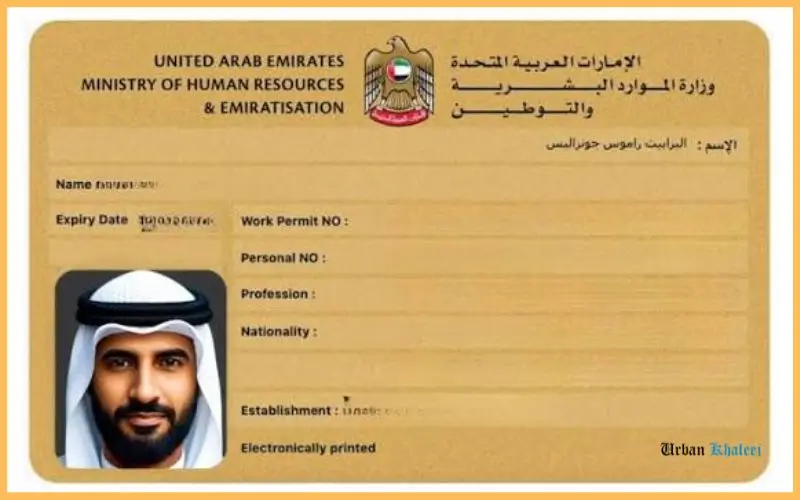
Labour Card Check enables UAE employees to verify the details of their work permit and ensure that their employment records are accurate. If their permit has expired or been cancelled, this could cause problems should they wish to change jobs or renew their documents. The Ministry of Human Resources and Emiratisation (MOHRE) offers official online services which allow employees to access information about their work permit eligibility. Using these services, employees can obtain their card number, check the status of their permit and get their digital documents. Knowing how the process works will help you to spot any errors and deal with problems in your employment records by contacting the appropriate UAE authorities.
Quick Facts
| Detail | Information |
| Official authority | Ministry of Human Resources and Emiratisation (MOHRE) |
| Online enquiry portal | MOHRE Enquiry Portal |
| Mobile application | MOHRE UAE |
| Main document | Electronic work permit |
| Customer support | 600 590 000 |
| International contact number | +971 6 803 4000 |
| Digital document | Available through supported MOHRE services |
| Free zone employees | May need to contact their respective free zone authority |
Source: the official MOHRE enquiry and contact services.
What Is a Labour Card in the UAE?
A labour card from the UAE is the document usually employed to describe the worker’s registered work permit; it links the employee with an approved employment arrangement and includes information which can be used to identify the worker and their employment record.
The government is no longer dependent on the traditional physical card, and MOHRE is responsible for overseeing work permits and employment records for private-sector businesses within its area of jurisdiction. Employees usually obtain their information electronically via official services.
According to the provisions of Article 6 of the Federal Decree-Law No. 33 of 2021, as amended, neither an individual nor an employer can work in the UAE or employ a worker, respectively, without the appropriate work permit being issued in accordance with the relevant rules.
A digital work permit may contain details such as:
- The name and identification details of the employee.
- Number of work permit or labour card.
- Employer or establishment details.
- Registered occupation or profession.
- The validity of the permit and details relating to the employment.
The kind of details that are shown will vary according to the service and the record in question.
Who needs to verify their work permit?
It is useful for employees who have just joined a company, have obtained a new permit, have changed employers, or are about to have their permit renewed to check their employment records. The action is also helpful if an employee cannot find their old card number or if they want to verify that their records show a recent change in employment.
New staff members must tell the difference between an application that is still being processed and one which has been issued. The fact that a job offer has been approved or that an application has been received does not in itself mean that all the later employment or immigration requirements have been fulfilled.
How to Perform a Labour Card Check Online
The best place to go when you want to check your UAE work permit details is the official MOHRE enquiry portal. Pick the service that suits your needs and then follow the instructions.
Step 1: Open the Official Portal
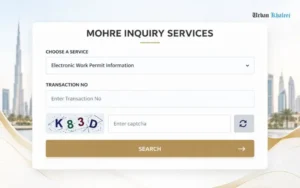
Go to the MOHRE Enquiry Portal and make sure that you are on the official government website before entering any personal details.
Step 2: Select the Appropriate Service
There is an option named Electronic Work Permit Information or Print Electronic Work Permit. The range of services available may vary as the government updates its portal.
Step 3: Enter the Required Details
For the service you have chosen, your work permit number, transaction number, person code or date of birth might be required so enter the information that is asked for accurately.
Step 4: Submit and Review the Result
Carry out any necessary verification and then choose Search. Check the record displayed to see the permit details, the validity information, and the available status indicators.
Official portal: inquiry.mohre.gov.ae
If nothing shows up, make sure that the details you’ve entered and the service you’ve chosen are correct. The fact that a result is missing doesn’t necessarily mean that your permit has been cancelled. If you need any more help, get in touch with MOHRE or your employer.
How to Check Through the MOHRE Mobile App
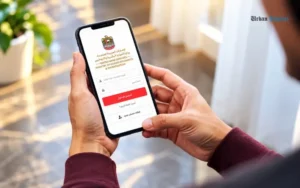
For employees who prefer to view their employment records on a smartphone, the MOHRE UAE mobile application provides another possibility. According to official information from MOHRE, its website, mobile application and customer service channels are all means of accessing ministry services.
Follow these steps:
- Get the official MOHRE UAE application from the app store on your device.
- Log in to the programme using the authentication method currently available, for example, UAE PASS where this is available.
- Look for the employee services or the section relating to employment records.
- Look at the information linked to your account regarding the work permit.
- Check the details and use the document or printing option that is available.
The programme might ask you to verify your identity before displaying your personal employment history, and since the names of the menu items and the features can vary, you should adhere to the instructions currently provided in the official app.
Make sure that you have logged in with the right identity and that your employment record is within the jurisdiction of MOHRE; you may also get assistance by using the official enquiry portal or by contacting the ministry.
How to Find Your Labour Card Number
Your permit number is not necessarily the same as your Emirates ID number, personal code or transaction number since these identifiers have different uses and it is possible that the system will not be able to find your record if you enter one of them into a field intended for another.
The table below makes the difference clear.
| Identifier | What it identifies | Where to look |
| Labour card or work permit number | A specific work permit record | Digital permit or relevant MOHRE record |
| Person code | An employee identifier used in ministry records | Employment documents or MOHRE enquiry |
| Transaction number | A particular application or transaction | Application receipt or related correspondence |
| Emirates ID number | Your UAE identity record | Emirates ID card |
| Passport number | Your passport identity record | Current passport |
Finding the number on your employment documents
Begin with your electronic work permit, your approved employment contract, the job offer or the correspondence relating to your application. Search for a field clearly marked work permit number, labour card number, person code or transaction number.
It would be wrong to suppose that all the numbers on an employment document can be used interchangeably. For example, a contract reference or application number might assist in finding the record even if it is not the number printed on the permit.
What if you only have your Emirates ID?
To find out which verification method is available for your situation, you can use the MOHRE application or get in touch with the ministry. While you should keep your Emirates ID at hand for identity verification, do not assume that entering its number into each enquiry form will succeed.
To protect yourself, do not publish your Emirates ID, passport information or work permit details on social media or send them to unofficial websites.
How to Download or Print Your Digital Labour Card
Employees who wish to obtain a copy for their own records can make use of the official electronic permit service. There is a service labelled ‘Print Electronic Work Permit’ on the MOHRE enquiry portal that allows users to get the relevant document when the necessary details are available.
To obtain a copy:
- Access the official MOHRE enquiry portal.
- Choose the Print Electronic Work Permit.
- Input the identification or transaction details asked for by the service.
- Provide the information and then view the result.
- If the record is available, you can use the print option given or the print function of your browser.
If you’d like to get a digital copy, see whether the service has a download feature. The document can be saved in PDF format via the print dialog in your browser when this option is available.
Store the document in a secure place and use it only for proper employment or administrative purposes. Whenever you send it to a bank, a government department or to another employer, make sure you check which document that organisation actually needs.
A printed version may be useful for convenience but does not take the place of the official electronic record; if the information is out of date, you should ask for clarification from MOHRE or your employer rather than making your own changes to the document.
How to Understand Your Work Permit Status

After a successful enquiry, it is necessary to carry out a thorough review of the information that is displayed; the result could involve a permit, an application, a contract or another employment transaction, depending on the service that you have chosen.
Since these are different kinds of records, the outcome of an application should not be taken automatically as indicating the status of a permit which has already been issued.
| Result or situation | What it may mean | Recommended action |
| Active or valid permit | The record indicates that the permit is currently valid | Check the expiry date and other details |
| Expired permit | The recorded validity period has ended | Ask your employer to confirm renewal requirements |
| Cancelled permit | The permit record has been cancelled | Confirm the cancellation date and any outstanding employment matters |
| Application in progress | The transaction has not reached its final recorded outcome | Ask the employer or authorised representative for an update |
| No record found | The selected service could not locate a matching record | Verify your details and contact MOHRE if necessary |
| Incorrect employee details | The displayed information may not match your documents | Request correction through the appropriate official process |
These are general interpretations and cannot take the place of an official decision from the relevant authority; the exact phrasing and the available statuses may vary from one enquiry service to another.
What to do if your permit has expired
Get in touch with the human resources department of your employer or with their authorised representative to find out if a renewal application has been made; ask for the application reference relevant to this and make sure you know what the following steps are expected to be.
You should not carry on under the impression that a pending renewal automatically confers validity on an expired permit; instead, you must check your actual work authorisation and any relevant immigration requirements with the appropriate authorities.
What to do if your permit is cancelled
You should look into the cancellation record in the light of your particular employment situation. In the case of having resigned, changed jobs or having finished a contract, request confirmation of the cancellation and retain copies of the relevant correspondence.
If you think the cancellation is unexpected or that it has been recorded incorrectly, you should get in touch with MOHRE as soon as possible. Make sure that your employment contract, job offer, salary records and all other relevant documents are kept available should the ministry need to look into your case.
Labour Card Check for Free Zone Employees
It is not the case that all employees in the UAE make use of the same work permit system, since someone working in a free zone might have their employment records managed by the appropriate free zone authority rather than going through the normal MOHRE procedure.
The appropriate authority is determined by the employer’s registration, the nature of the employment agreement and the relevant rules; employees in Dubai, Abu Dhabi, Sharjah, Ajman, Ras Al Khaimah, Fujairah and Umm Al Quwain should not think that the emirate on its own decides which system holds their record.
If the company for which you work is based in a free zone, you should ask the human resources department or the authorised representative of the company to tell you which authority issued your permit. Then, get the relevant information from that authority’s official website or through their employee services.
If you are uncertain as to whether your employer’s records come within the scope of MOHRE or a free zone authority, you should check this point before carrying out your searches on different portals.
Common Problems and How to Resolve Them
The fact that an enquiry has failed doesn’t mean that your employment records are invalid. In most cases the problem can be dealt with by verifying the details entered, choosing the right service or getting in touch with the organisation which is responsible for the records.
The portal says no record was found
Make sure that the reference number matches the one you have selected; a transaction number, a person code and a work permit number are not interchangeable.
If the details are accurate, request that your employer or their authorised representative verify that the permit was issued and that the relevant information is in the system. If the problem persists, then get in touch with MOHRE directly.
Your name or profession is incorrect
To compare the electronic record with your passport, employment contract and other official documents, if you spot any discrepancy, then let your employer know and find out how the record can be corrected via the proper channel.
Retain a copy of the wrong record together with any supporting documents and do not make any changes to the digital document yourself or depend on an unofficial website to correct it.
Your new permit is not showing
If you have recently joined a company, the application might still be being processed or the record which has been issued may not have become available via the service you have chosen. You should ask your employer for the transaction reference and for the most recent outcome of the application.
The key point is to distinguish between an application made by an employer and a permit which has in fact been issued. Make sure you verify the result before considering that your employment authorisation is complete.
The website or app is not working
Reopen the official website, verify your internet connection or use a different up-to-date browser. However, if the problem still continues, you should get in touch with the ministry instead of sending your personal information to a third-party site.
If you are unable to obtain the document electronically, you can get help from an authorised service centre.
Official MOHRE Contact Details
If the problem is not solved by the online services, the Ministry of Human Resources and Emiratisation offers a number of ways to get in touch and receive assistance.
| Contact method | Details |
| Official website | mohre.gov.ae |
| Enquiry portal | inquiry.mohre.gov.ae |
| UAE call centre | 600 590 000 |
| International call centre | +971 6 803 4000 |
| ask@mohre.gov.ae |
The details can be found in MOHRE’s official contact information.
Before you get in touch with the ministry, make sure you have your passport or Emirates ID, the name of your employer, your work permit or transaction reference, and a short explanation of the issue. You should only provide your identification documents via the correct official channels.
If the issue is one concerning unpaid wages, the wrong cancellation or some other matter relating to employment rights, find out about the appropriate complaint procedure; the MOHRE worker guidance also lists 80084 as the number for the Labour Claims and Advisory Centre.
Important Employment Rules to Know
Getting a permit is only one aspect of keeping employment records accurate; employees should also make sure that their job offer, the contract they have registered and their actual working arrangements are consistent.
The official guidance from the UAE government sets out many safeguards for workers in the private sector, such as the necessity of having the correct work permit and the provision that it is the employers’ responsibility to cover the costs of recruitment and employment rather than passing these on to the workers directly or indirectly.
Make sure you retain copies of the signed job offer, the employment contract, your salary records and any official correspondence. Such documents can be of use in establishing the facts should a dispute occur.
You shouldn’t suppose that your old permit continues to be valid when you change employers; the new employment situation had to satisfy the relevant work permit requirements, and the status of the previous permit should be checked separately.
Just as a valid work permit does not automatically mean that all residence or immigration requirements have been met, the MOHRE is in charge of labour-related records, whereas residence permits and matters concerning the Emirates ID are the responsibility of the relevant immigration and identity authorities, including the Federal Authority for Identity, Citizenship, Customs and Port Security (ICP).
Conclusion
It is helpful to check your electronic work permit since this allows you to keep record of your employment and spot any discrepancies before they lead to administrative difficulties. You should begin by using the official MOHRE enquiry portal, choose the right service, and then check the information against your employment documents.
If your permit has gone missing, has expired or has been recorded incorrectly, you should get in touch with your employer or MOHRE for clarification. Employees who are working under a free zone authority should get in touch with that authority when it is appropriate. You must always base your confirmation of your right to work in the UAE on official records and not on assumptions or on unofficial websites.
Read Also: Jebel Ali Postal Code 00000 Guide | PO Box & UAE Mail
Workers Village Mussafah – Accommodation, Facilities & Location
Frequently Asked Questions
How can I perform a Labour Card Check online?
Go to the MOHRE enquiry portal, choose the appropriate service, input the necessary details and check your work permit information.
Can I check my labour card using my Emirates ID?
It is possible for certain services to offer identity verification, but since your Emirates ID number is not the same as your work permit number, you should follow the instructions on the portal or get in touch with MOHRE.
Is a Labour Card Check free in the UAE?
Official MOHRE enquiry services which are available can be accessed online, while further services obtained from external providers may carry fees.
How can I download my labour card online?
To open the MOHRE enquiry portal, choose ‘Print Electronic Work Permit’, input the required details and download or print your record if one is available.
Can I check my work permit without its number?
You could use another verification method that is supported in order to get your record, or else you should get help from MOHRE or your employer.
What should I do if my work permit has expired?
Check with your employer to verify the renewal procedure and your present status. It is not possible to assume that a pending application gives you the right to work.
Do free zone employees use the MOHRE portal?
It isn’t always necessary; free zone staff might have to verify their work permit with the appropriate free zone authority.