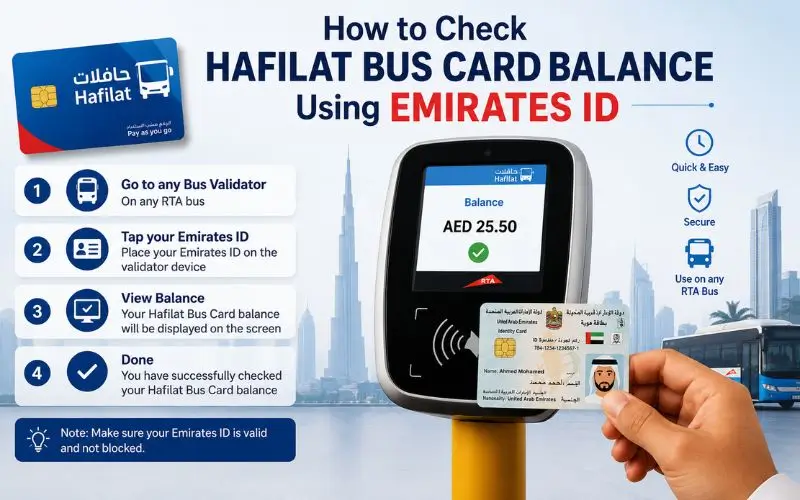
The Emirates ID is not just a government-issued ID card; it is a portal to various public services, such as managing your Hafilat bus card, if you are residing and commuting in Abu Dhabi. You can use the Emirates ID for a hafilat balance check to enjoy a more secure and personalized account experience than you could with the mere card serial. It also opens up important protections that anonymous cardholders don’t get.
This guide will explain how the Emirates ID relates to your Check Hafilat Bus Card Balance, why it is significant, how to use your Emirates ID to check and manage your Hafilat card, and what benefits the personalized system will bring over the conventional anonymous card.
The Connection Between Your Emirates ID and Hafilat Card
Not all Hafilat cards are alike. There are two types of systems: Anonymous and personalized, and there is a big difference between them.
Anonymous Hafilat Card: This card has no identity attached to it. It is easy to pick up, load, and operate. It is easy for tourists and short-term visitors to use, but it has a significant drawback; if the card is lost, damaged, or stolen, the remaining balance is irretrievably lost.
Personalized Hafilat Card: This is a card that is linked to the user’s data and is registered with Emirates ID. It’s perfect for individuals who live in the area or frequently commute to and from work. If the card is lost, the remaining money can be moved to another card, as with anonymous cards, it is safer.
The Personalised Hafilat Card (PHC) is connected to your Emirates ID and the account, and the amount will not be affected even if the card is lost or stolen. If you’re a frequent Abu Dhabi public bus traveler, there’s one key action to take to preserve your balance and enjoy more account management options: switch to or register a personalised Hafilat card.
Why Your Emirates ID Matters for Hafilat Card Management
More than just about balance protection, linking your Emirates ID to your Hafilat card opens a range of additional account management capabilities, making your journey more seamless and transparent.
Balance recovery: In case you lose your card or it gets stolen, you will be able to report the loss and have the remaining balance transferred to a new card for a fee of AED 5, which is linked to your Emirates ID account.
Complete transaction history: You have access to your entire transaction history with the account, which will be useful to you when tracking your expenses, claiming reimbursements, and addressing any disputes regarding your billing.
Darb portal sign-in with your ID linked to Emirates ID: Each time you sign in to the Darb portal, you can do so with your personal details, email, Emirates ID, and traffic number, without having to enter your card serial number each time, and you can manage your card from a secure, identity-verified account.
Only personalized cards are available for use for access to subsidized travel: Senior Citizen and People of Determination cards allow free or heavily discounted travel. The special pass for senior residents in Abu Dhabi is only available with a personalized Hafilat card, which is linked to the passenger’s Emirates ID.
Auto top-up eligibility: Most of the time, the Darb app and portal set up the automatic recharge function with a registered account linked to your Emirates ID, which means you will have the convenience of not running out of balance without realising it.
How to Register Your Hafilat Card With Your Emirates ID
The first step to checking your Hafilat balance with your Emirates ID is to connect your card to a personal account on the Darb platform. The following is how to do it.
Option 1: Register Online via the Darb Portal
- Open any browser and visit haflatbalanccheck.ae.
- On the portal, click on “Create Account” or “Register.
- Fill in your personal details:
- Emirates ID full name (as indicated on your Emirates ID)
- Emirates ID number
- Your driving license or Vehicle Registration Number (VHR) (if any) in Abu Dhabi
- Email address
- Mobile number
4 . Make a secure password according to the security needs of the site.
5 . Check your email and mobile account for a confirmation message for validity
6 . After you have created your account, log in and go to “My Cards”.
7 . To register your 16-digit Hafilat card serial number and connect it to your registered account, enter the card serial number into the field.
8 . Verify the information and save
Now your card is connected to your Emirates ID. This verified identity will be linked to all future balance checks, transactions and account management.
Option 2: Register Through the Darb Mobile App
It is available on App Store and Google Play for both Android and iOS. Sign up or sign in, if you already have one. Details consist of your name, e-mail, cell phone number, and Emirates ID.
- Install the Darb app from the Google Play Store (Android), Apple App Store (iOS).
- Access the application and click “Sign Up.
- Fill out your details, including your name, email, mobile phone, and Emirates ID.
- Set a password and check your account using the OTP that you receive on your phone.
- Once you have signed in, go to “My Cards” and click on the “+” sign.
- Tap in your Hafilat card serial number or scan the card with your cell phone.
- Check card information and save.
Once connected, your Emirates ID authenticated account provides you with complete access to checking balance, recharging, and transaction history within the app.
Option 3: Register In Person at a Customer Happiness Center
If you prefer face-to-face registration, visit any Hafilat Customer Happiness Center at a major Abu Dhabi bus terminal, including Abu Dhabi Central Bus Station, Al Wahda, Mussafah, or Al Ain Bus Terminal.
Bring:
- Your physical Emirates ID card
- Your Hafilat card (or the card serial number if applying for a new personalized card)
Staff will register your card to your identity, link it to your account, and provide you with access credentials for the Darb portal.
How to Check Your Hafilat Balance Using Your Emirates ID
Once your card is registered and linked to your Emirates ID, checking your balance becomes more straightforward; you no longer need to locate your card serial number every time.
Method 1: Via the Darb Portal (Account Login)
Follow these steps to check your Hafilat balance online: Go to the official DARB platform for Abu Dhabi transport. If you don’t have an account, create one using your Email, Emirates ID, and Traffic Number along with a secure password.
Step-by-step:
- Go to haflatbalanccheck.ae in your browser
- Click “Login” and enter your registered email address and password
- Once logged in, navigate to “My Cards” from the main dashboard
- Select your linked Hafilat card
- Your current balance, card type, expiry date, and recent transactions will all be displayed on the card detail screen
- No need to enter your card serial number the Emirates ID-linked account retrieves your card details automatically
This method is especially convenient for users who manage multiple Hafilat cards for family members or employees under one registered account.
Method 2: Via the Darb Mobile App (Emirates ID Account)
- Open the Darb app and log in using your registered email and password (tied to your Emirates ID)
- Tap “My Cards” and select your linked Hafilat card
- Your current balance appears immediately on the card detail screen
- You can also view your last five trips, recent recharges, and card expiry in the same view
- Enable push notifications from settings to receive automatic alerts when your balance drops below AED 10
Method 3: Via the TAMM Portal (UAE PASS Login)
UAE PASS is an integration of your Emirates ID and Abu Dhabi’s one-stop government service portal. If you have registered your identity at UAE PASS, you can use the Hafilat card services without manually keying in your credentials at TAMM.
- Open the TAMM app or go to tamm. Abu Dhabi in your browser
- Sign in with UAE PASS (which is connected with your Emirates ID)
- Type “Hafilat Card Services” or click on the transport section
- Click on your connected Hafilat card from the list
- Now you’ll be shown your current balance, card information, and transaction history.
By connecting with your Emirates ID, UAE PASS verification ensures the greatest level of security when accessing your Hafilat account.
Personalized vs. Anonymous Hafilat Card: A Full Comparison
Knowing the practical differences can help you choose which card to use and why the Emirates ID with a personalized card is the preferred option for residents in the long run.
| Feature | Anonymous Card | Personalized Card (Emirates ID linked) |
| Registration required | No | Yes (Emirates ID) |
| Balance recovery if lost | Not possible | Full balance transferred |
| Card replacement cost | Full new card fee | AED 5 |
| Online account access | Card number only | Email + Emirates ID login |
| Transaction history | Limited | Full history on the Darb portal |
| Auto top-up | Not available | Available |
| Special card categories | Not available | Senior, PWD, Student available |
| Best for | Tourists, short-term visitors | Residents, daily commuters |
The Personalized Hafilat Card is issued with the following details of the user (typically they are associated with an Emirates ID): It is best suited for residents and regular users as it provides enhanced security and account management facilities. In the event that the card is lost, the balance that remains can be moved to another card, so it’s safer than anonymous cards.
How to Get a New Personalized Hafilat Card Linked to Your Emirates ID
If you already have an anonymous Hafilat card and need to upgrade to a personalized card, or if you’re new to the region of Abu Dhabi and want to start with the best card type for you from the get-go, follow these steps.
Online Application via Darb Portal
- Please register on hafalbalanccheck.ae above in the registration section.
- After logging in, go to Card Services and click on “Apply for Personalized Card”.
- Enter your Emirates ID and personal information
- Select your card type from: standard, student, senior citizen or people of determination…
- Pay AED 25 online (Card issuance fee).
- Pick up your card at the pick-up point or send it out if it is available to you.
In-Person Application
Make a visit at any of the Hafilat Customer Happiness Centers with your Emirates ID and the AED 25 issuance fee. Staff will have your card registered, and connect to your Emirates ID on the spot, and give you your account details on the Darb portal.
What to Do If You Have an Anonymous Card but Need Balance Protection
Once you have an anonymous card, you can’t link it to your Emirates ID on most platforms as the anonymous card, by design, can be used without any ID. Two options are practical, though:
Option 1: Buy a new card with a custom design. Visit a Customer Happiness Center to get a new personalised Hafilat card and transfer the balance to the new card, then register the new card on your Emirates ID account.
Option 2: Continue with the anonymous card for small amounts of extra credit. If you like the convenience of the anonymous card but would like to reduce risk, consider maintaining a low balance, loading just what you need for the next few days. This ensures that in case of loss or damage, there is a minimal amount of loss.
Security Best Practices When Using Emirates ID for Hafilat Services
Connecting the Emirates ID to the Hafilat account is a good security measure, but it also notes a person’s sensitive personal details. Here are some best practices to keep it safe:
Have a robust and distinctive password for your Darb account. Avoid using the same password as you use on your banking, email, and social media accounts. If someone gets your information, a unique password for your Darb account is meant to limit the exposure.
Only access your Hafilat account on official platforms. Darb/Payit/Authorized Channels Only: Recharge only through Darb/Payit/Authorized outlet. Don’t give your card number to strangers. Maintain the confidentiality of your credit cards. The same applies to your account logon; only enter your Emirates ID and password in hafilat.darb.ae and the official Darb app.
Do not log in to accounts using public wi-fi. WiFi hotspots at malls, cafés, and transport centres can be easily hacked. To access your Hafilat account or recharge online, use your mobile data connection.
Update your Emirates ID & phone number on Darb. Please notify Darb immediately if your Emirates ID is renewed or if information regarding your contact details has changed. If the phone numbers or emails are incorrect, you will not receive OTPs, balance updates, or notifications.
Use two-step verification when available. Both the Darb platform and UAE PASS support the verification steps; use them if they are provided as an additional layer of security to your account.
Immediately report a lost or stolen card. Please check your Darb account or contact them if your personalized Hafilat card is lost. Your balance is linked to your Emirates ID account and so is protected when your card is blocked, and can be transferred to a new card for AED 5.
Read Also:ATM Check Balance
Ratibi Balance Check Number
UAE Salary Check Online
Frequently Asked Questions
Are Emirates ID compatible with Emirates Tourism cards/short-term visitors? An
Emirates ID is only granted to UAE residents, tourists, and persons who come to the UAE for a short-term visit without an ID. The anonymous Hafilat card or Contactless Smart Ticket (CST) is the card to be used by visitors to the site. These cards can be purchased at bus stations, airports, and retail outlets throughout Abu Dhabi.
What is the traffic number to join the Darb account?
To register, go to the official Darb website using your email, Emirates ID, and traffic code number. The traffic number is usually the number on your driving license from Abu Dhabi or the vehicle registration number. The Emirates ID is the main identity verification field if you don’t have a driving license or registered vehicle in the UAE city of Abu Dhabi, leave this field blank or enter “N/A”.
Do I need to update my Hafilat account if I renew my Emirates ID?
Yes. The Emirates ID card number will change once you renew your Emirates ID. Please log in to your Darb account and update your Emirates ID information to make sure that your account details are correct and your card is working properly.
Is it possible to connect multiple Hafilat cards with the same Emirates ID?
Yes. You can add more than one Hafilat card to a single account, and this is useful if, say, you are a family or an employer, and you need to coordinate the travel of several people. All cards are dealt with individually in the same account dashboard.
If my Emirates ID-linked card expires, what will be the impact on my balance?
Fines will be issued if an expired card is used on the bus. It is required to be renewed, and the balance will move over. To renew your card before its expiry date, visit a Customer Happiness Center or the Darb portal. Any balance that you have will also be transferred to the renewed balance automatically because they are linked to your Emirates ID account.
Does Emirates ID allow me to view my Balance (Hafilat) for free?
Yes. All the methods to check your balance at Hafilat are free and include logging into your Darb account via your Emirates ID.
Final Thoughts
The most effective tool you have in securing your Hafilat card is your Emirates ID. By connecting the two via the Darb portal or application, you become a card user with a protected account and receive access to your transactions, auto top-up, balance alerts, and complete card recovery, as opposed to being an anonymous card user whose account is depleted when the card is lost. If you use the public transport system of Abu Dhabi and frequently consult the bus timetables on Hafilat, the few minutes required to register your Hafilat bus timings with your Emirates ID account are very valuable. No matter what happens to the physical card in your wallet, your balance remains secure, your account remains available, and your day remains unaltered.