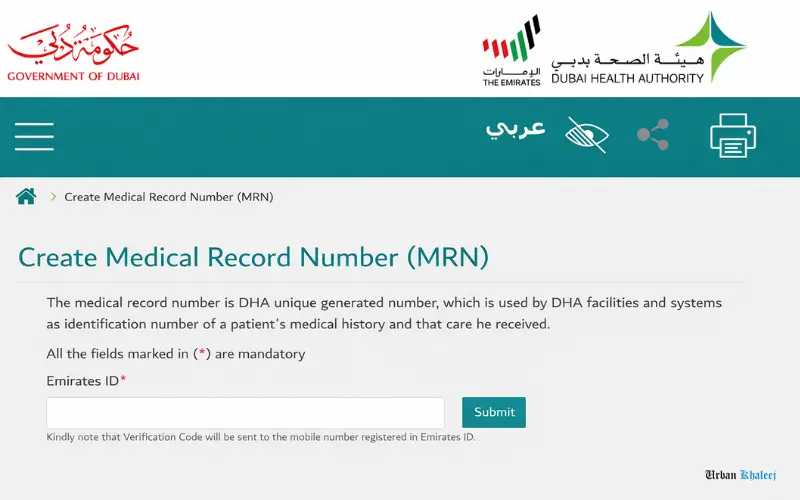
It is not as difficult as it might appear to get your MRN number in Dubai. MRN is the short name of Medical Record Number, which is a special ID that is assigned by the Dubai Health Authority to your medical history to be tracked in every medical facility in Dubai. This is a complete guide to all that you need to know about your MRN number, including what it is and why you need it, as well as a step-by-step account of how to register your number online as well as in person. This is a guide on how to do everything in a simple way, whether you are a resident of the city with an Emirates ID, a tourist visiting the city, or a parent enrolling children. You will also know how to make your MRN online in as little as 5 minutes and at no cost, retrieve your MRN in case of forgetting it, resolve the most common registration issues, and use your MRN to make appointments and access medical services. There are also special cases during which tourists, children under 16, and individuals whose mobile numbers are not related are covered by the GUI, de and the difference between the MRN and Health Card is also explained to eliminate all ambiguity.
What is the MRN Number in Dubai
MRN is an abbreviation of Medical Record Number. It can be your healthcare passport in Dubai. This is the amazing number that the Dubai Health Authority provides to you to manage all your medical history in one location. All doctor appointments, all laboratory services, and all prescriptions are attached to this single number.
After your MRN, you have it forever. Changing hospitals does not imply you change your MRN. Changing physicians is not a problem since you will be using the same MRN. Returning to Dubai after years in exile implies that your old MRN is still in good working condition.
How Your MRN Works
Your MRN links all of your health data to the healthcare system of Dubai. When a physician calls up your MRN, they are provided with all of it. Past visits and treatments appear immediately. Results of the blood test done in any DHA facility will be reflected in your record. X-rays and scan reports are just there. The history of medication remains recorded. Reported allergies are flagged. The records of vaccination are still available. Admissions into the hospital are monitored.
It is much better than having to explain your medical history over and over again. The computer does not forget anything.
DHA vs DoH – Know the Difference
Dubai has a healthcare system known as DHA or Dubai Health Authority. Abu Dhabi has DoH, which is an abbreviation that means the Department of Health. These are distinct systems, and they have different MRN numbers.
In case you are treated in both emirates, you should have different MRNs. Dubai MRN operates in DHA only. Abu Dhabi MRN is involved in DoH facilities. Similar trends are found in other emirates. UAE has not yet consolidated these systems; hence, remember this.
The majority of the population will only require the Dubai MRN as it is where they reside and work. However, understand that your Dubai MRN will not necessarily be recognized in case you go to a government hospital in Abu Dhabi or Sharjah.
Why You Need an MRN Number in Dubai
This is not a free figure in case you desire healthcare in Dubai. This is the reason why everybody needs one.
Accessing Medical Services
DHA hospitals and primary health centers need your MRN to treat you. Walk-in clinics need it. Appointments of specialists require it. It is even required to keep proper record-keeping of even emergency room visits.
Lacking an MR, you end up spending the same amount of time filling out long registration forms each time. Check-in is in seconds with an MRN.
Health Insurance Requirements
To make claims, insurance companies in Dubai require your MRN. They inquire about when you are taking health insurance. They require it when you make claims to determine your treatment history.
The MRN also helps your insurer to access your medical records and determine the coverage you require, and grant your policy correctly. Processing of claims becomes faster when all the links are to your MRN.
Online Healthcare Access
The DHA mobile application and website have a myriad of services to use; however, accessing them requires an MRN. Make bookings through your mobile phone. Checking lab results does not involve making a call. Access prescription history on the Internet. Access medical reports at any time. Vaccination certificates will be immediately available. Look at the future appointments.
All of this requires that MRN. It is your access to the digital healthcare environment of Dubai.
Faster Treatment Process
Picture this scenario. You come to a clinic in a bad mood. You cannot do it without an MRN because you are asked to fill in 3 pages of the forms concerning your medical history, medications you are taking, allergies, and previous surgical procedures. Spends fifteen minutes when you only need to visit a doctor.
They are given the number with an MRN. They drag it all up in a second. In 2 minutes, you are in the office of a doctor. It is the actual advantage – speed when you need it most.
Who Needs an MRN Number
Nearly all people who may access healthcare in Dubai require it.
Residents and Citizens
You require an MRN in case you are residing in Dubai having a residence visa. UAE citizens are automatically in need of one. Valid visa holders of expatriates require one. Whatever type of visa you have does not matter, a work visa, family visa, investor visa, or a retired visa. To live in Dubai, one has to acquire an MRN.
Age does not matter either. Newborn babies get MRNs. Elderly residents need them. Each one in the middle requires one.
Tourists and Visitors
Surely, even tourists can have an MRN in Dubai. When you pay a visit to any AHA hospital or clinic during your visit, they will make one, based on your passport. It remains applicable even in subsequent visits.
Other tourists do not believe that they require it since they are there to visit. However, in case you fall ill or have an accident in Dubai, an MRN will hasten the process of getting care in government hospitals. Moreover, as long as you come to Dubai, that MRN is developing your medical history here.
Children and Dependents
Children should have their own MRN regardless of their age. Your 3-month-old baby requires an MRN. Your teenager needs an MRN. Can not share yours with them – they have their own special number.
In the case of children whose age is less than 16, registration is done by the parents or guardians. Children aged 16 years and above have the option of registering either online or in person.
What You Need to Register
This is required by the residents in Dubai, who must have a valid Emirates ID as a mandatory requirement. The linked Emirates ID mobile number is mandatory. Information on the date of birth is necessary. An email address is not compulsory, but advantageous.
For tourists, you require your passport. Visa copy if you have one. Mobile number for contact. Date of birth information.
That is it. No long list of documentation, no intricate paperwork.
How to Get an MRN Number in Dubai Online
The following is the simplest method – it can be done at home within half an hour.
Method 1: DHA Website
This is a way the majority of people obtain their MRN, as it is simple and fast.
Step 1: Open the DHA Portal
Visit the Dubai Health Authority webpage and find the MRN registration page. You can simply type Create MRN Dubai in Google, and then it is going to take you there. The page is rather straightforward – a form to fill in.
Step 2: Enter Your Emirates ID
Enter 15-digit Emirates ID number. This appears on the first page of your ID card at the very top of the center. It is the long one beginning with 784.
Check again to ensure that you have typed it correctly. Even a single digit will not locate you.
Step 3: Get Your OTP
This is where it matters – the system will send a One-Time Password to the mobile number that you have with your Emirates ID. This is the reason why you should be connected with your mobile before your ID.
Check your messages. You will get a 6-digit code. The duration of this code is 5 minutes, and do not stray.
Step 4: Fill Out Your Details
Once you have entered the OTP, you will be presented with a form requesting all the information, such as your full name as it appears on the Emirates ID. The date of birth must be identical. Select your gender. Choose your nationality. Key in the current address in Dubai. Include contact email in case you have one.
It must all be identical to your Emirates ID. All the information is cross-checked in the system.
Step 5: Submit and Save
Click submit. Your MRN is displayed on the screen. It is usually a 10-digit number.
Take a screenshot of this page or use the number. The first appointment will require you to have it. Other individuals manage to save it on their phone’s note app or forward it to themselves via email.
Method 2: DubaiNow App
DubaiNow is a good application compared to websites.
Get DubaiNow in the App Store or Google Play. It is the official Dubai government services application – manages all of the parking fines to healthcare.
Open the application and create an account with UAE Pass. In the event that you do not have the UAE Pass yet, you should do that. Takes another 5 minutes.
After you get there, go to the Healthcare section. Search Create MRN or Patient Registration. Tap that button.
Add your Emirates ID number or passport. Verify with the OTP they sent. The MRN appears immediately on the app.
The good thing about the app is that you can keep your MRN there. View any time without looking through old screenshots by opening the app.
Method 3: Dubai Health App
It also has a specific Dubai Health app. It also functions in the same manner as DubaiNow, but with healthcare services as the only subject.
Install it, create an account with your Emirates ID, select the MRN section, and go through with the instructions. Your MRN is born at that point.
The Mobile Number Problem
This is actually the trap that catches most people, and you have to be connected to your Emirates ID before you can get an MRN online.
Without being connected, you will not get the OTP. No OTP translates to no MRN registration on the Internet.
To connect your mobile to Emirates ID, it will cost you AED 52.10, and it will take between 3 to 7 days to be processed. You do it using the ICA, which is the Federal Authority of Identity and Citizenship.
In case you do not have time to wait one week, and in case you cannot afford to do so, do not use the online method and register face-to-face instead. Much faster that way.
How to Get an MRN Number in Person
Then, do not want to cope with websites and applications, just go to the hospital.
Visit Any DHA Facility
Each hospital and health care center of DHA develops MRNs at its registration points. Enter the door, inform them that you require an MRN, and they will assist you on the spot.
This is popular in the Rashid Hospital around the Maktoum Bridge. The Al Baraha area has a well-functioning Dubai Hospital. Latifa Hospital is handy in Al Jaddaf. Al Baraha Health Center is accessible. That is served by Nad Al Sheba Health Center.
Primary health facilities do exist. Identify the nearest one and visit them during his or her working time.
The In-Person Process
Go to the registration counter. Ask them if you have to make an MRN. This is what they hear all day long- it has become their order of things.
They shall require your Emirates ID. Hand it over. Give them your passport instead, in case you are a tourist.
The employee puts in your details in their system. Takes about 2 minutes. They will request you to check your mobile number and address.
Your MRN is created in the system. They will either print or write it on a receipt. Other hospitals issue a temporary health card with the MRN printed on it.
That is it. The entire process is probably 10 minutes without any kind of waiting line.
When to Visit
The majority of DHA facilities are working between 8 AM and 8 PM every day. Others have varied timings; therefore, confirm before visiting what time the particular hospital is open.
Emergency departments operate around the clock (24 hours/day) and around the week (7 days/week), though they may not be the most appropriate place to make an MRN unless you are an emergency patient. Visit at regular times only to make registration.
Friday and Saturday weekends are found to be busier with families. On working days, long lines are normally shorter in the morning.
How to Find Your Existing MRN Number
Lost your MRN or forgot it, or cannot remember whether you even had one- here is the method to locate it.
Check Old Medical Documents
Begin with the simplest – rummage through the medical records of the past. MRN is on the papers for hospital discharge. Lab test results show it. It is printed on doctor appointment slips. It is contained in prescription receipts. Medical bills display it. It is listed in vaccination certificates. It is printed on any DHA health card that you may possess.
Check the upper section or header. MRN will be followed by your number.
Retrieve It Online
The DHA website allows you to access your MRN in case you have forgotten it. Same portal that you would use to create a new portal.
Visit the MRN site, but do not create a new one; seek the retrieval or inquiry option. Enter the ID number Emirates.
In the event that you already have an MRN in the system, it will be displayed automatically. No OTP required to access the data – only to write to it.
Use the DubaiNow App
Click on Open DubaiNow, select Healthcare services, and choose View MRN or any other option. Log in with UAE Pass.
Your MRN is shown there in case you are registered previously. The app is most likely the fastest method of checking.
Call DHA Customer Service
Dial 800 34,2, which spells out 800 DHA. They have a helpline that is available 24 hours a day.
Ask them if you have to get your MRN. They will require your Emirates ID information to identify you. Upon confirmation, they will give you your MRN over the phone.
You may also refer to your request by email to info@dha.gov.ae. Provide your full name, Emirates ID number, and date of birth. They normally take a day to respond.
Visit a Hospital
Just visit any DHA facility and walk to the registration des,k and request them to check your MRN. Carry your Emirates ID.
All they need to do is search their system and print out your MRN. This is in spite of the fact that you might have been registered several years ago and at another hospital; nevertheless, the system is centralized in all the facilities.
MRN for Tourists and Visitors
Planning to visit Dubai and imply the access to healthcare – this is what you should know.
Do You Need One
In case you are visiting Dubai on vacation and you are healthy, you may never require an MRN. However, in case you fall ill, are injured, or require any medical care in a DHA facility, you will have one automatically.
Visa processing medical fitness tests imply that you will receive an MRN in the process . An emergency room visit implies that they make one in the process of treating you.
The qualification of becoming an MRN as a tourist does not require any prior qualification; however, you will have one upon utilizing DHA healthcare services.
How Tourists Get Their MRN
Enter any hospital or health center of DHA. Go to the registration desk carrying your passport.
Inform them that you need a treatment or an appointment. They will enroll you in their system with your passport number rather than your Emirates ID.
The process takes 5 to 10 minutes. They develop your MRN and attach it to your passport. Done.
Tourist MRN Validity
There is the fun bit here, your tourist MRN does not run out. You can get back to Dubai in 5 years, and that same MRN still functions perfectly.
The medical history of past visits is stored in the system. This is a helpful health record that is kept here in case you are a regular visitor to Dubai.
The next time you require medical attention in Dubai, all you have to say is that you already have a DHA MRN that you have gotten previously. Provide them with the number, and they retrieve your existing records as opposed to creating a duplicate.
MRN for Children and Dependents
Children require their own MRN – not capable of sharing the one with them.
Children Under 16
Children below the age of 16 are registered by parents or legal guardians. One can do this online or physically.
In the case of online registration via the DHA website, the child’s Emirates ID number ought to be used. The OTP is sent to the parent’s mobile number, which is the number attached to the child’s Emirates ID.
The children’s information, and not yours, must fill in the form. The system generates an MRN for that particular child.
Physically, present your Emirates ID anyour d child’s Emirates ID to any of the DHA offices. The registration desk does all the stuff.
Documents for Children
The child’s Emirates ID is required as the primary document. A birth certificate is occasionally demanded. Parent Emirates ID demonstrates association. Permission from the parent, in case you are a guardian.
The vaccination records are assistive, and not compulsory when acquiring the MRN. They come in handy to keep on file.
Teenagers 16 and Up
As soon as your kid is 16, he or she can apply to receive his or her MRN. They do not require you to do it on their behalf anymore.
They will be required to have their own Emirates ID and the mobile number attached to it. The OTP is sent to their phone and not yours.
This also provides the teens with self-service to book appointments and view their health records.
Common Problems and How to Fix Them
These are the problems that people encounter most frequently.
Mobile Not Linked to Emirates ID
This is problem number one. You key in your Emirates ID on the internet and wait, but nothing comes. No message arrives.
Usually implies that your mobile number is not connected to your Emirates ID. The system is not capable of sending you the code. The resolution is to make a connection on your number via the ICA site. Expenses AED 52.10 and takes 3 to 7 days. Or skip registration on the internet and simply visit a hospital physically – they are not required to undergo verification of the OTP.
System Says MRN Already Exists
You attempt to create an MRN and get a message stating that the MRN already has this Emirates ID.
You know you have one already – good news. You simply forgot or did not notice that you got one previously.
The remedy is to employ the retrieval technique rather than the creation technique. Confirm the old medical records number. Or call DHA customer service to call your current number.
OTP Not Received
You have known that your mobile is connected, yet the OTP is still not displayed.
Some of the things to consider trying include retesting to ensure that you keyed in your Emirates ID. Wait 2 to 3 minutes, as messages may take some time to arrive. Look in the spam or junk mail folder of your phone. Attempt to resend the OTP since there is a Resend button in most cases. Turn off your phone and restart. Call your telecom provider in case it continues to fail.
In some cases, it has not been the DHA system that has a problem, but your mobile network.
Emirates ID Not Recognized
The system does not recognize your Emirates ID number, although you have entered the correctly typed one.
It may be due to your Emirates ID expiring. Check the expiry date. Your ID has only been given out, and it is not yet active in every system; hence, it takes 24 to 48 hours. The ID number has a typo, hence you are expected to check each number.
Should it be freshly issued, it will be well to wait a day or two and then re-trial. New Emirates IDs make time to spread across all government systems.
Tourist Without Emirates ID
The online registration is not available to tourists. The system will need an Emirates ID number.
Resolution is to come to any DHA facility physically. They take the registration of tourists based on their passport details. Takes 10 minutes at the desk. Online registration does not have a workaround in the absence of an Emirates ID.
Using Your MRN Number
Have the MRN now. Here is how to actually use it.
Booking Medical Appointments
Open the DHA app or website. Find booking of appointments. Choose the hospital or clinic that you wish to attend.
Select your physician and appointment time. You have to provide patient details by entering your MRN number.
The system automatically draws your information. You will not complete your name, date of birth, and address once more; they are already available as your MRN.
Confirm the appointment. Before you visit, you will receive an SMS reminder.
Checking Lab Results
Were blood work or other tests at a DHA facility checked online by the internet rather than by telephone or on-site? Access the DHA portal using your MRN. Click on the lab results section.
All the test results are displayed there, typically within 24 to 48 hours of the test. You are able to access them, download PDFs, and share them electronically with other doctors.
Much better than making someone read results on the phone and holding the phone.
Hospital Check-In
Show up for your appointment. Go to the registration desk.
Give them your MRN. They access it and immediately view your patient record. Check in. Check your identity, and you will be checked in.
Uses 30 seconds as opposed to filling forms. The medical history is automatically updated after visiting the hospital – no paperwork on your part.
Insurance Claims
Give your MRN to your health insurance provider when you are applying.
MRN Number vs Health Card Number
People often confuse these two. Let me clarify the difference.
| Feature | MRN Number | Health Card Number |
| What It Is | Your medical record identifier | Physical card for subsidized care |
| Who Issues It | Dubai Health Authority | Dubai Health Authority |
| Main Purpose | Track all your medical records | Get discounts at government hospitals |
| Cost | Free | AED 300 to 500 per year |
| Who Needs It | Everyone is using DHA healthcare | Optional mostly for regular users |
| Format | 10-digit number | Physical plastic card |
| Validity | Lifetime never expires | One year needs renewal |
| For Tourists | Yes, tourists get MRN | No residents only |
They can retrieve your health records by it at your request. This assists them in determining your health correctly to approve the policy. Process claims of proven treatment records. Verify treatment and drug prescriptions. Derive the coverage and reimbursements properly.
The entire insurance process is made easy, as everything is addressed properly.
The major distinction is that your MRN is simply a number – free, permanent, necessary with all patients. A Health card is a literal card that you can purchase to receive a discount on medical care in government hospitals.
You require your MRN in order to receive a Health Card. However, it is possible to possess an MRN and not have a Health Card. The majority of the expats who have their own insurance simply utilize their MRN without the need to bother with the Health Card.
Important Tips to Remember
Remember these things to have an easy time accessing healthcare.
Save Your MRN Securely
After receiving your MRN, do not misplace it. Here is how to keep it safe. Take the confirmation as a screenshot and save it to the photo albums. Write it in your phone notes application. Forward it to yourself with the subject Dubai MRN. Store in your passwords. Share it with family members. Carry a hard copy in your wallet. Include it in your health insurance documents.
You will use this figure frequently. Make it easy to find.
One MRN Per Person
Every person obtains his/her own MRN. One MRN cannot be shared by the family members.
Your husband/wife should get a different MRN. You will require individual MRNs for each of your kids. Your international parents should have their own MRNs.
The system monitors individuals, but not families.
Keep Contact Info Updated
Your MRN is associated with your personal information. Once things change, update them. New mobile number, update it in the DHA system. A change of address will imply a change of address. Altered email implies an update as well.
This will ensure that you are given appointment reminders, test result notifications, and other vital healthcare messages.
Updating details can be done via the DHA site, app, or by going to any of the facility registration desks.
MRN is Completely Free
The cost of creating your MRN is free. Retrieving it costs nothing. There is no cost in having it forever.
When any of the websites request toy payment to obtain an MR, then it is a scam. The official services of DHA are free at all times.
You can spend money on real medical services you get – medical consultations, tests, procedures. Nevertheless, the MRN is never anything short of free.
Conclusion
One of the things that appear to be tricky is actually getting your MRN number in Dubai. Then you see that it takes 5 minutes and cost nothing at all.
The process is simple and easy, whether you visit the DHA site or app online, or just by simply walking into any hospital. The result is an enduring number that makes it easier and quicker to access healthcare in Dubai.
There will be no repeat filling of similar forms. Stop having to retell your medical history. No further misunderstanding of your books. All you have to do is enter your MRN, and it will be in the system.
Then you had not had yours yet; go ahead and do it now, when you think about it. You may have it some time or other – may as well have it prepared. Does not require the time that this guide required.
Have a problem call DHA at 800 342 anytime. They explain to you how to do it step by step. You need to save your MRN somewhere safe when you do. Send this guide to friends and family that require their MRN as well.
It is this simple figure that makes your health care journey in Dubai begin. Take it, store it, and carry it along whenever you require medical services.
Frequently Asked Questions
What is MRN number Dubai?
It is your Medical Record Number that is issued by Dubai Health Authority. The code is 10 digits, and it is a tracking code of all your healthcare information in one location across the DHA facilities.
How to get MRN number online?
Go to the DHA site, input your Emirates ID, confirm your OTP which will be sent to your mobile and your MRN will be created instantly in a matter of 5 minutes.
Is MRN number free?
Yes, completely free. No registration fees, no renewals fees, no maintenance fees. It is free to make and get your MRN.
Time to reach MRN
|human|>Time to reach MRN
Online consumes between 2 and 5 minutes after commencement. Physical visit to the hospital involves some 10 minutes plus any queue waiting period. Instant either way.
Is it possible to make MRN without Emirates ID?
It requires the residents to have Emirates ID to undertake registration online. Passports may be used by the tourists, who are required to enroll physically in any of the DHA facilities.
What in case my mobile is not connected with Emirates ID?
Either connect it via ICA website that costs AED 52.10 and takes between 3 and 7 days to do it or get your MRN registered on the spot at a hospital rather than online.
Do children need MRN?
No, each individual of any age must have his/her MRN. Parents can enroll children below 16 years old with the use of child Emirates ID.
Can tourists get MRN in Dubai?
Yes, the tourists receive MRN automatically whenever they visit any DHA facility to receive treatment. They utilize passport rather than Emirates ID.
How to find my existing MRN?
Check previous hospital records, find it online at DHA site with your Emirates ID, DubaiNow application, contact 800 DHA or visit any of the hospital registration desks.
Is MRN same across UAE?
No, Dubai MRN operates in DHA facilities only. There is another DoH in Abu Dhabi. Medical records are maintained by each of the emirates.
Is MRN required in case of private hospitals?
The majority of the private hospitals in Dubai need it or are linked to the DHA system. Others possess their systems but are more and more incorporating with DHA to have consolidated records.
MRN required documentation What documents were required?
The residents require Emirates ID and associated mobile number. Tourists need passport. There it is, so easy requirements.
Can I have multiple MRNs?
No, every individual is supposed to have one MRN only. In the event that you received more than one, call DHA to combine them into one record.
What if I lost my MRN?
You can use DHA Web site, DubaiNow application as well as dial the customer care on 800 DHA or visit any hospital with your Emirates ID and the information can be accessed.